Best EPUB Reading Apps for PC in 2026
With the ever-growing popularity of eBooks, choosing a reliable EPUB reading app for your PC is more important than ever. Whether you're reading novels, academic papers, or technical manuals, the right EPUB reader can greatly enhance your experience. Below, we review the best EPUB reading apps for PC in 2026 based on usability, features, and performance.
1. Calibre
Overview
Calibre is a powerful all-in-one eBook management solution. Beyond reading EPUB files, it allows users to organize libraries, edit metadata, and convert between formats.
Calibre has become something of a rite of passage for ebook power users—and for good reason. The first time I imported my scattered collection of EPUB, MOBI, and PDF files, Calibre immediately organized, tagged, and presented everything within a single, unified library. Its library management capabilities are unmatched: you can edit metadata in bulk, convert between formats, automatically retrieve cover art, and sideload books to almost any eReader, including older Kindles and Kobos.
What truly sets Calibre apart is its plugin ecosystem, which feels like a sandbox for advanced users—offering everything from one-click news downloads and recipe scrapers to automated backups and custom workflows. Admittedly, the interface carries a hint of “Windows 7–eraâ€?nostalgia, and newcomers may find it overwhelming at first. But once you’re managing large libraries or conducting serious research, it becomes clear that power and flexibility matter far more than visual polish. There’s a reason Calibre is so widely praised in academic and university circles—it simply delivers.
Pros
- Free and open-source
- Supports nearly all eBook formats
- Advanced library and metadata management
- Built-in format conversion tools
- Plugin ecosystem
Cons
- Interface feels outdated
- Steeper learning curve for beginners
Ideal for: Power users who want full control over large eBook libraries.
2. Sumatra PDF
Overview
Sumatra PDF is a lightweight and fast reader supporting EPUB, PDF, MOBI, and comic book formats. Its minimalistic design prioritizes speed over features.
Sumatra PDF has quietly earned its place as a favorite among users who value speed and simplicity above all else. The first time you open a PDF, EPUB, or MOBI file in Sumatra, the difference is immediately noticeable: it launches almost instantly and gets out of your way just as fast. There’s no library to manage and no interface to learn—just a clean, lightweight reader that focuses entirely on the content.
What makes Sumatra PDF stand out is its minimalism done right. It supports a wide range of formats, including PDF, EPUB, MOBI, CHM, and DjVu, yet remains remarkably small and efficient. Features like tabbed reading, fast search, and keyboard shortcuts make it especially appealing to developers, researchers, and anyone who spends long hours reading technical documents. While it lacks advanced annotation tools and library management, that’s precisely the point: Sumatra PDF isn’t trying to be everything. It’s a no-nonsense reader that prioritizes speed, stability, and readability—and for many users, that’s exactly what makes it indispensable.
Pros
- Extremely fast and lightweight
- No ads or bloatware
- Portable version available
Cons
- No library management
- Limited customization options
Ideal for: Users who want a simple, no-frills EPUB reader.
3. Adobe Digital Editions
Overview
Adobe Digital Editions (ADE) is widely used for reading DRM-protected EPUB files, especially those borrowed from public libraries.
Adobe Digital Editions (ADE) is a dedicated ebook reading application designed primarily for accessing and managing DRM-protected digital publications. Commonly used by libraries, publishers, and educational institutions, ADE supports EPUB, EPUB3, and PDF formats and integrates closely with Adobe’s DRM system. For many readers, it serves as the gateway between online ebook providers and local devices, enabling borrowed or purchased titles to be downloaded, authorized, and transferred securely.
While its feature set is intentionally restrained, Adobe Digital Editions focuses on compliance and compatibility rather than customization. It offers basic library organization, bookmarking, highlighting, and note-taking, making it suitable for academic reading and structured coursework. The interface is functional rather than modern, and performance can feel dated compared to lightweight readers, but ADE remains an industry standard wherever DRM enforcement and publisher control are required. For users who rely on library loans or protected ebooks, Adobe Digital Editions is often not optional—it’s essential.
Pros
- Supports DRM-protected EPUB and PDF
- Bookmarking, notes, and highlights
- Clean and familiar interface
Cons
- Limited to Adobe DRM ecosystem
- Occasional performance issues
Ideal for: Library users and DRM-protected eBook readers.
4. Thorium Reader
Overview
Thorium Reader is a modern, open-source ebook reading application built with accessibility, standards compliance, and privacy in mind. Developed by the DAISY Consortium and EDRLab, it supports EPUB, EPUB3, PDF, DAISY, and audiobooks, making it especially well suited for inclusive reading and educational use. From the outset, Thorium emphasizes clean design and distraction-free reading, offering a more contemporary experience than many traditional desktop readers.
What sets Thorium Reader apart is its strong commitment to accessibility and open standards. It includes robust support for screen readers, keyboard navigation, read-aloud features, and advanced typography controls, ensuring content is usable by readers with diverse needs. While it lacks advanced library management or format conversion tools, Thorium excels as a standards-compliant, DRM-aware reader that respects user privacy and works consistently across platforms. For readers seeking a modern, ethical, and accessibility-focused alternative to mainstream ebook apps, Thorium Reader stands out as a compelling choice.
Pros
- Excellent accessibility features
- Text-to-speech support
- Clean and modern interface
Cons
- Basic library management
Ideal for: Accessibility-focused readers.
5. FBReader
Overview
FBReader is a fast and customizable EPUB reader with cloud syncing and cross-platform support. It is a versatile and lightweight ebook reading application known for its speed, broad format support, and cross-platform availability. It supports popular formats such as EPUB, MOBI, FB2, PDF, and HTML, and is widely used on Android, Windows, macOS, Linux, and eReaders. Designed with performance in mind, FBReader offers a smooth reading experience even on lower-powered devices, making it a long-standing favorite among users who prioritize efficiency over visual complexity.
FBReader stands out for its high degree of customization and ecosystem flexibility. Readers can fine-tune fonts, margins, colors, and page layouts, while optional cloud syncing enables reading positions and libraries to stay consistent across devices. Although advanced features like annotations, PDF handling, and extended format support may require paid versions or plugins, FBReader remains a dependable, no-frills reader that balances simplicity with control. For users seeking a fast, customizable, and platform-agnostic ebook reader, FBReader continues to be a practical and proven choice.

Pros
- Highly customizable reading experience
- Cross-platform support
- Cloud sync for reading progress
Cons
- Advanced features require paid version
Ideal for: Readers who value customization and syncing.
6. Icecream Ebook Reader
Overview
Icecream Ebook Reader offers a visually appealing interface with solid library organization features. It is a visually friendly desktop ebook reader designed for users who value simplicity, comfort, and a modern interface. Supporting formats such as EPUB, MOBI, PDF, FB2, and CBR/CBZ, it offers an approachable reading experience with an emphasis on ease of use rather than technical complexity. From the moment you import books, Icecream Ebook Reader presents them in a clean, bookshelf-style library that feels intuitive even for first-time users. The reader focuses on everyday reading comforts, offering features like bookmarking, text highlighting, night mode, adjustable fonts, and reading progress tracking. Its minimalist design makes long reading sessions pleasant, while basic library organization helps keep collections manageable. While advanced tools such as format conversion, deep metadata editing, or device syncing are limited compared to power-user platforms like Calibre, Icecream Ebook Reader excels as a straightforward, visually polished solution for casual readers who want a hassle-free way to enjoy ebooks on their desktop.
Pros
- User-friendly interface
- Night mode and fullscreen reading
- Good library organization
Cons
- Pro version required for advanced features
- Limited format support
Ideal for: Casual readers who prefer a polished UI.
7. Epubor Reader
Overview
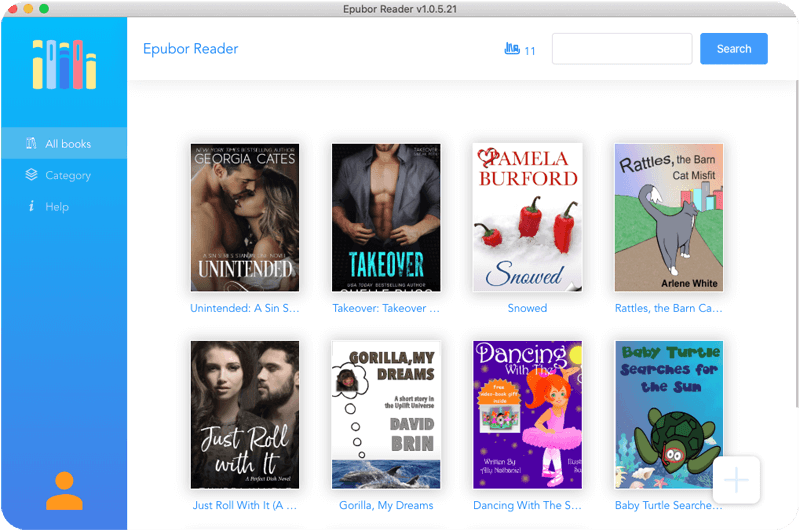
Epubor Readeris a lightweight desktop ebook reading application designed for users who want a simple, distraction-free way to read DRM-free ebooks. Supporting common formats such as EPUB, PDF, and MOBI, it focuses on delivering a smooth and comfortable reading experience without the complexity of full library management systems. The interface is clean and straightforward, making it easy for new users to start reading immediately.
Epubor Reader emphasizes readability and ease of use, offering essential features such as font and layout customization, bookmarking, night mode, and reading progress tracking. While it does not aim to compete with advanced platforms like Calibre in terms of metadata editing or large-scale library organization, Epubor Reader works well as a dedicated reader for everyday use. For users who prefer a fast, intuitive ebook reader—especially alongside other Epubor tools—Epubor Reader provides a practical and user-friendly solution.
Pros
- Simple and intuitive interface
- Optimized for EPUB format
- Fast performance with large EPUB files
- Easy navigation and reading controls
Cons
- Limited advanced library management
- No built-in format conversion tools
Ideal for: Users who want a lightweight, dedicated EPUB reader without complex features.
Final Verdict
- Best overall: Calibre
- Fastest reader: Sumatra PDF
- Best for DRM: Adobe Digital Editions
- Best accessibility: Thorium Reader
- Best customization: FBReader
- Best lightweight EPUB reader: Epubor Reader
No matter your reading habits, one of these EPUB readers will suit your needs in 2026. Choosing the right app ensures a smoother, more enjoyable digital reading experience.